
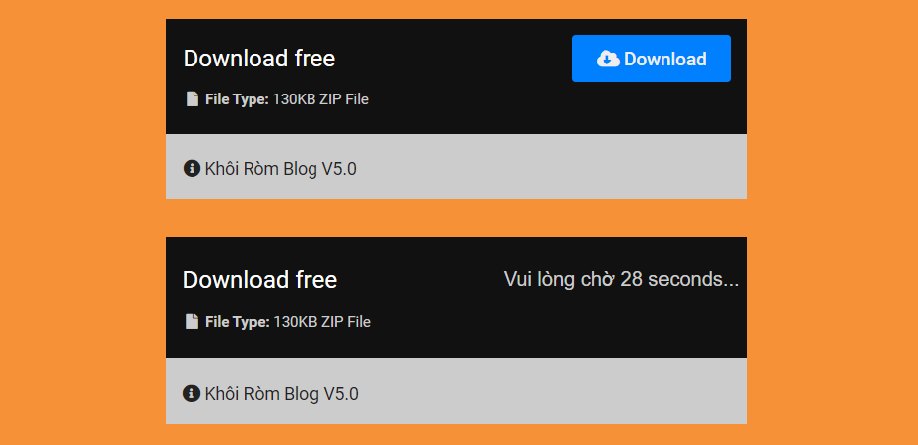
The download button transfers the link, so normal. Use this download box with countdown timer, it makes your blog more professional and keeps users longer.
How to do it
Step 1: insert this js code before the closing body tagYou notice the l=30 line means 30s, you can edit the number of seconds as you like.
<script type='text/javascript'>

//<![CDATA[

function generate(){var e,n=document.getElementById("downloadx"),t=document.getElementById("btnx"),a=document.getElementById("downloadx").href,l=30,d=document.createElement("span");n.parentNode.r eplaceChild(d,n),e=setInterval(function(){--l<0?(d.parentNode.replaceChild(n,d),clearInterval(e),window.location.replace(a),n.style.display="inline"):(d.innerHTML="<p style='font-family:Google Sans, sans-serif'>Please wait "+l.toString()+" seconds...</p>",t.style.display="none")},1e3)}
//]]>

</script>
Step 2: insert css
#btnx{cursor:pointer;padding:10px 20px;border:0;border-radius:3px;background:#007fff;color:#eeeeee;float:right;text-transform:capitalize;font-weight:500;transition:all 0.5s;font-size:15px}

#btnx:hover,#downloadx:hover{background:#222222;color:#eeeeee;outline:none}

.download_now{display:block;margin:0 auto;border-radius:4px}

.download-now{background-image:url('');color:#cccccc;padding:15px;display:block;background-size:480px;background-blend-mode:exclusion;background-color:#111111}
.download-title{color:#fff;display:inline-block;font-size:1.2em;line-height:38px;text-align:left}

.file-info{padding:15px;background:#cccccc;color:#222;font-size:14px}

#downloadx{float:right}

#downloadx{padding:10px 20px;border-radius:3px;background:#ffc832;text-decoration:none;color:#222;float:right;text-align:center;font-size:15px;text-transform:capitalize;-webkit-box-sizing:border-box;-moz-box-sizing:border-box;box-sizing:border-box}

.download_button span{display:inline-block;line-height:38px;float:right}

.file-description{display:block}

.file-description span{font-size:12px}
Step 3: Switch to the HTMl tab while writing and insert the code below
<div class="download_now">

 <div class="download-now">

 <div class="download_button">

 <div class="download-title">Download free</div>

 <button onclick="generate()" id="btnx"><i class="fas fa-cloud-download-alt"></i> Download</button>

 <a id="downloadx" href="#" style="display:none"><i class="fas fa-cloud-download-alt"></i> Get Link</a>

 </div>

 <div class="file-description">

 <span class="file-size"> <i class="fa fa-file fa-fw" aria-hidden="true"></i> <strong>File Type:</strong> 130KB ZIP File</span>

 </div>

 </div>

 <div class="file-info"><i class="fas fa-info-circle"></i> Khoi Rom Blog V5.0

 </div>

</div>
Remember to edit accordingly!
Post a Comment